AD DESIGN WORKFLOW
The ad was sold on Tuesday. Design found out on Thursday.
AdScout gives every sold ad a spec, a due date, and a place in the designer's queue — and the Digital Asset Manager keeps the logo, the photo, and last year's version where the designer can actually find them.
THE PROBLEM
Designers end up doing account management.
The handoff between sales and design is where most publications lose the most time, and almost none of it shows up in a report. A rep sells a half page. The specs arrive as a forwarded email with the subject line "ad for Friday." The logo is attached to a message from two years ago. Nobody is sure whether the client approved the headline or just liked it.
Designers chase the rep for copy, chase the client for a usable logo, and rebuild artwork that already exists somewhere on a shared drive under a filename only one person understands.
Then the same ad runs again next month, and the whole cycle repeats, because there is no record that the finished version was ever the finished version.
THE ASSET LIBRARY
The logo is on the account, not in an email from two years ago.
Logos, product photography, and prior creative live against the advertiser. The designer opens the current approved file instead of searching a shared drive for a name only one person understands.
- Assets attach to the advertiser, so the approved version is the one found first
- A repeat or pickup insertion reuses the real file rather than triggering a rebuild
- At renewal the artwork is already there, so nobody asks the client for it again
One stored file

Shirt Shop
shirt-shop-logo.eps
Camera-ready

Mar 2025
Spring ad
Sep 2025
Fall promo
Mar 2026
Renewal
WHAT CHANGES
The job arrives complete, and the artwork comes back.
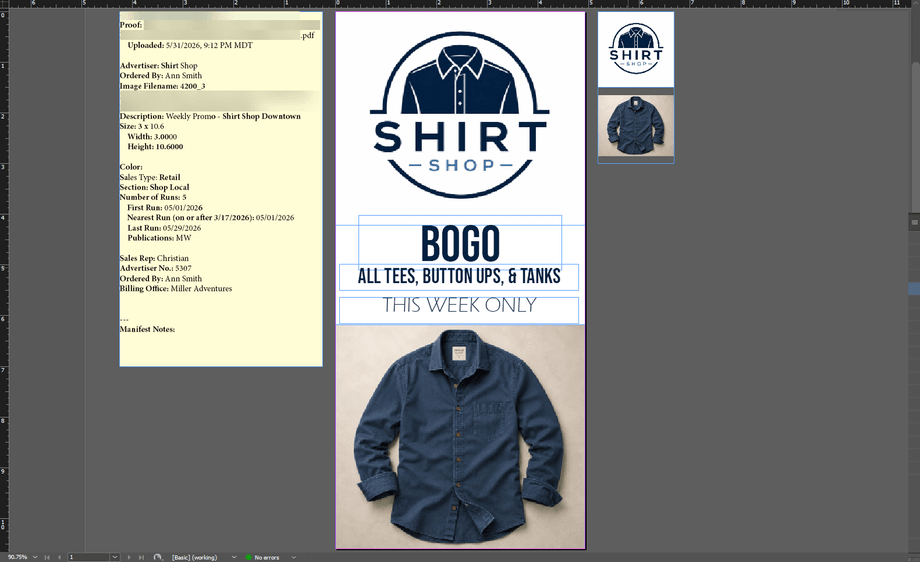
- Every sold ad arrives with size, colour, placement, issue date, and copy attached
- Designers work from a queue ordered by deadline instead of an inbox
- Logos, photos, and prior artwork are stored against the advertiser, not on a drive
- Repeat and pickup ads reuse the approved file rather than getting rebuilt
- Sales can see where an ad stands without walking over to ask
HOW IT WORKS
From sold order to finished art, without the email thread.
The order carries everything design needs, and the finished file goes back where the next insertion will find it.
- 1
The order carries the spec
When the ad is sold, size, colour, section, issue date, and instructions travel with it. Design does not have to reconstruct the job from a forwarded message.
- 2
Assets attach to the advertiser
Logos, product photos, and prior creative live in the Digital Asset Manager against the account, so the current version is the one the designer opens — not the newest email attachment.
- 3
The queue is the to-do list
AdScout shows what is due, for which issue, and what is still waiting on the client, in deadline order. The designer stops triaging and starts designing.
- 4
Status is visible to everyone
Sold, in design, out for approval, approved, placed. The rep can answer the client's question without interrupting the designer.
- 5
Finished art goes back on the account
Next time that advertiser runs, the approved file is already there, ready to pick up or revise. The rebuild stops happening.
PROOF
A weekly paper using the Fake Brains production tools cut a single issue's ad and page work from nine hours to five and a half — about 182 hours a year returned to the production department.
The publication asked to stay anonymous. The figure comes from the published PageScout case study, measured on the same production workflow.
- 9 → 5.5 hrs
- Ad and page work for a single issue, before and after.
- 182 hrs
- Returned to the production department across a year.
WHERE IT CONNECTS
Design sits in the middle of the workflow.
Ad proofing and approvals
Send the finished ad out for client approval, and keep the record of who signed off.
ExploreAd dummying and pagination
Place the approved ad on the page inside InDesign, from the real order.
ExploreAd sales CRM
Where the order and the spec originate, before design ever sees it.
ExploreCOMMON QUESTIONS
Questions publishers ask about ad design workflow.
The rest of the workflow
See It In Action
Walk us through one ad, start to finish
Sold on Monday, printed on Friday. Tell us every step it takes at your paper today, and we will show you which of those steps stop existing.