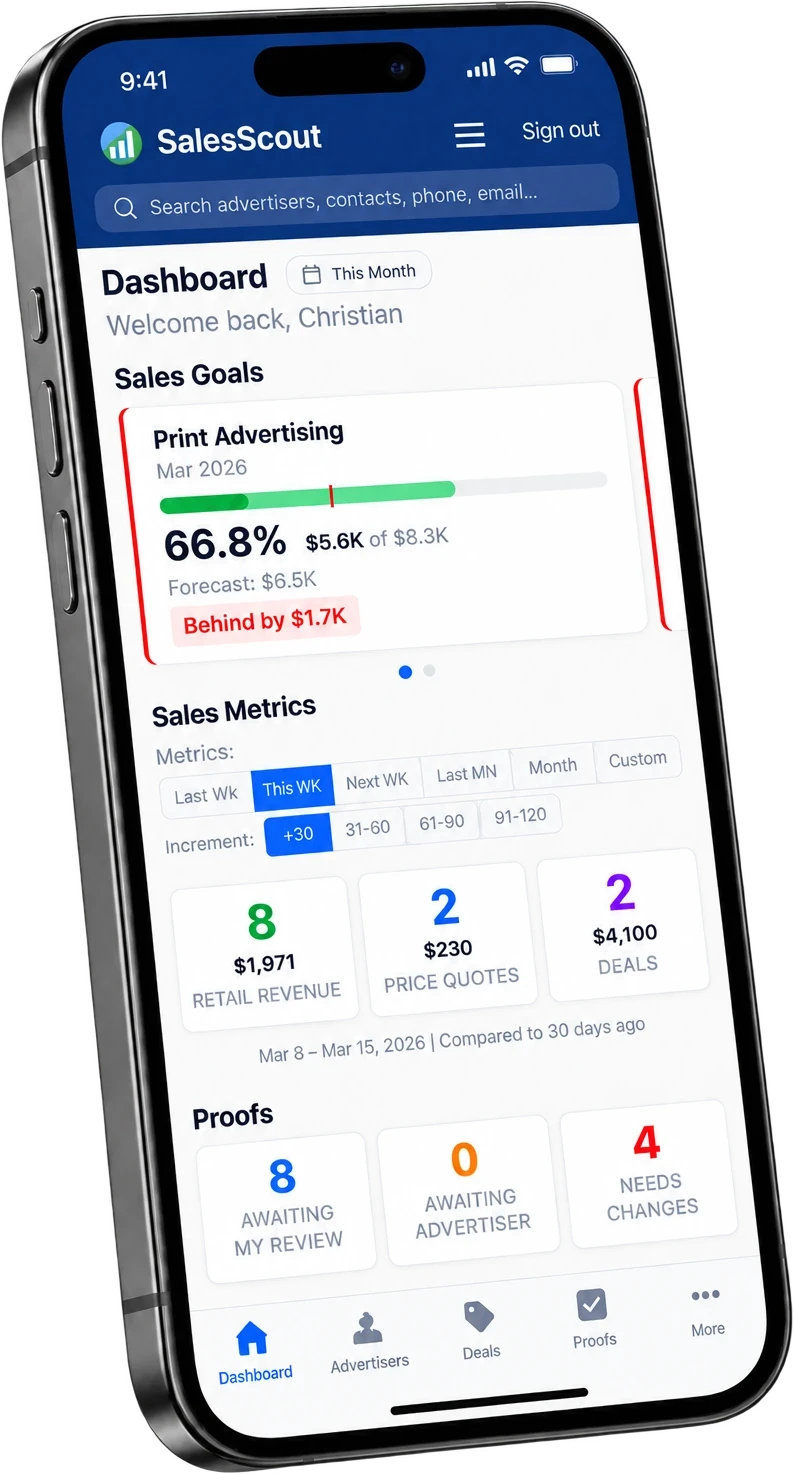
Your reps already know their accounts. SalesScout gives them somewhere to put it - every account, balance, quote, and follow-up, from the phone in their pocket. Nothing to install, and nothing to re-key when they get back to the office.
The ad sales CRM that is already part of your AccountScout.
SalesScout is the web and mobile CRM for ad sales teams at newspaper and media publishers. It is part of the AccountScout platform rather than a separate CRM - it reads and writes the same advertiser records, rate cards, and orders that AccountScout bills against, so a rep can quote, close, and log an order from a phone and nobody has to re-key anything.
Same database, different surface
Not a synced CRM and not an integration. The same records, presented for selling instead of administering.
Browser-based, mobile-first
Any modern browser on a phone, tablet, Mac, or PC. Passwordless login - enter an email address, get a verification code.
Included with AccountScout
Every user gets access. No per-seat mobile fee and no add-on tier.
Your reps say "I'll do it when I get back to the office" - and then they don't.
Your sales manager has no idea what the team actually did today.
Your CRM lives on a desktop that nobody opens after 3 PM.
Most of your ad sales history is a spreadsheet, an inbox, and one rep's memory.
The publisher asks what you quoted an account last year, and nobody can answer without digging through email.
Quotes sit in inboxes instead of turning into orders.
A DAY WITH IT
What the job actually looks like.
Morning
The call list is already built.
Open your phone and see which orders are expiring this week and which advertisers have gone quiet. Nobody had to run a report for you first.
Midday
On a call, with the whole account in front of you.
Pull up an advertiser and see their orders, balance, and history. Build a quote on the spot, email it from the record, and track it on your deals board.
End of day
Logged, not remembered.
Check where every deal stands and what is promised for tomorrow, from your desk or from the road. Nothing is waiting to be typed up.
THE DIFFERENCE
There is nothing to sync.
Most CRMs sold to publishers are a sales tool bolted onto an accounting system with a sync running between them. A rep sells the ad in one place, somebody re-types it in another, and the two versions drift until an advertiser disputes an invoice. SalesScout does not sync with AccountScout. It is AccountScout, with a surface built for selling on it.
Two ways in
SalesScout
the rep, in the field
One advertiser record
Orders and insertions
Rate card and discounts
Balance and payments
Contacts and activity
AccountScout
the office, on the desktop
No sync, no nightly export, no two versions drifting apart until an advertiser disputes an invoice. The quote a rep builds in a parking lot is the order the office bills.
Reps sell from the real rate card, not a copy of it - so the quote and the invoice agree
An accepted quote becomes scheduled insertions without anyone re-keying it
Calls, quotes, contracts, insertions, and payments sit on one timeline per account
When a rep leaves, the relationship stays with the publication
What your team can do
Everything here is shipping today.
Advertisers and history
My Advertisers and Other Advertisers views, governed by AccountScout roles
Account number, assigned rep, billing office, contacts, and address
Account balance, last touch, and next touch on the record itself
Global search across accounts, contacts, and phone numbers
Create a new advertiser from the field
Calls, notes, and follow-ups
Quick Note, Follow Up, or a full activity - call, email, visit, prospecting
Rich-text notes attached to the account, the contact, and optionally a deal
Scheduled follow-up reminders and full advertiser activity history
Clickable phone numbers for one-tap dialing
Sales Blitz: a ready-to-dial list worked one account at a time
The deals board
Drag-and-drop Kanban, with the stages you defined in AccountScout
Stage, value, expected close date, and Won or Lost
Activities and documents roll up under each deal
Built for longer-cycle sales - special sections, annual deals, digital bundles
Quotes and orders
Four-step wizard: advertiser, rate and section, publications and discounts, schedule
Color-coded publication dates in the scheduling calendars
Email a price quote, then Convert to Order when the advertiser accepts
Rerun an ad, submit a copy change, or schedule pickups per publication
Proofs
The whole queue, from New Ads through Design Ready, In Composing, and Awaiting My Review
Approve, request changes, or add designer notes
Email the proof to the advertiser, and the published copy after it runs
Proof work happens here or on the desktop - whichever is to hand
Email, payments, and documents
Personalized email from templates, sent from an account or a contact
Personal Email Tracking: opens and clicks per contact, in real time
Take a card or ACH payment, or save one on file without charging it
Attach proposals, contracts, and media kits to the advertiser record
FOR THE SALES MANAGER
Green means on track. Red means behind.
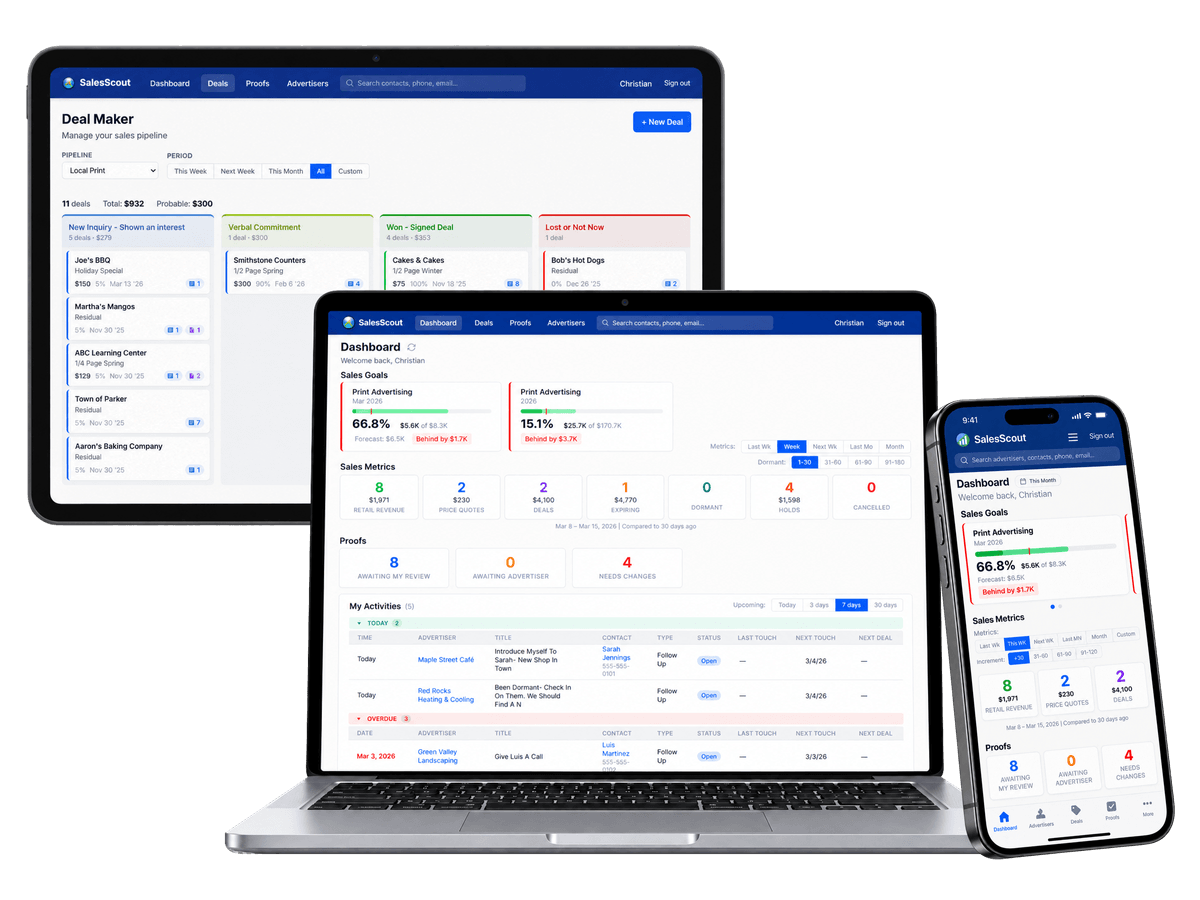
The dashboard is most of a sales manager's job on one screen - individual, team, and group goals across publications, each tile color-coded and clickable through to the detail behind it. Nobody has to ask a rep how the month is going.
The tiles
Sales Goals
Retail Revenue
Price Quotes
Deals
Expiring
Dormant
Holds
Cancelled
Sales Goals show progress as a percentage and how far ahead or behind the period is
Dormant advertisers filter by 1-30, 31-60, 61-90, and 91-180 days without activity
Daily Touch KPIs track new prospect contacts, follow-ups, and new relationship touchpoints in real time
A weekly sales rep report covers orders on hold, expiring ads, and activity gaps
300+ built-in reports, including pipeline, rep performance, and year-over-year account revenue - without exporting to a spreadsheet
ON THE CALL
The whole account, before you dial.
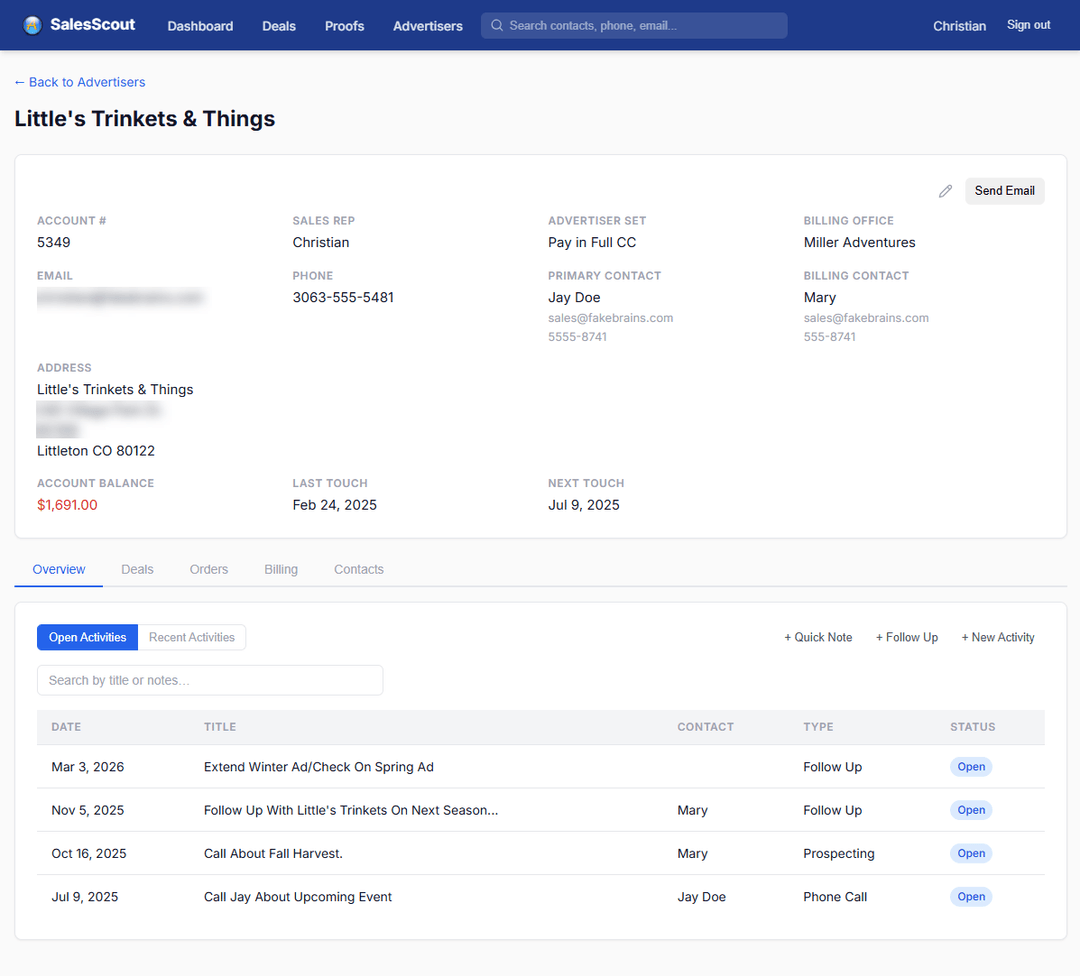
Balance, last touch and next touch sit at the top of the record, with every open follow-up underneath. A rep opens an advertiser already knowing where things stand rather than ringing the office to find out.
Account balance beside the date of the last contact and the date of the next one
Open activities with their date, type, contact and status, newest first
Deals, orders, billing and contacts one tab away on the same record
THE PIPELINE
Where every deal actually stands.
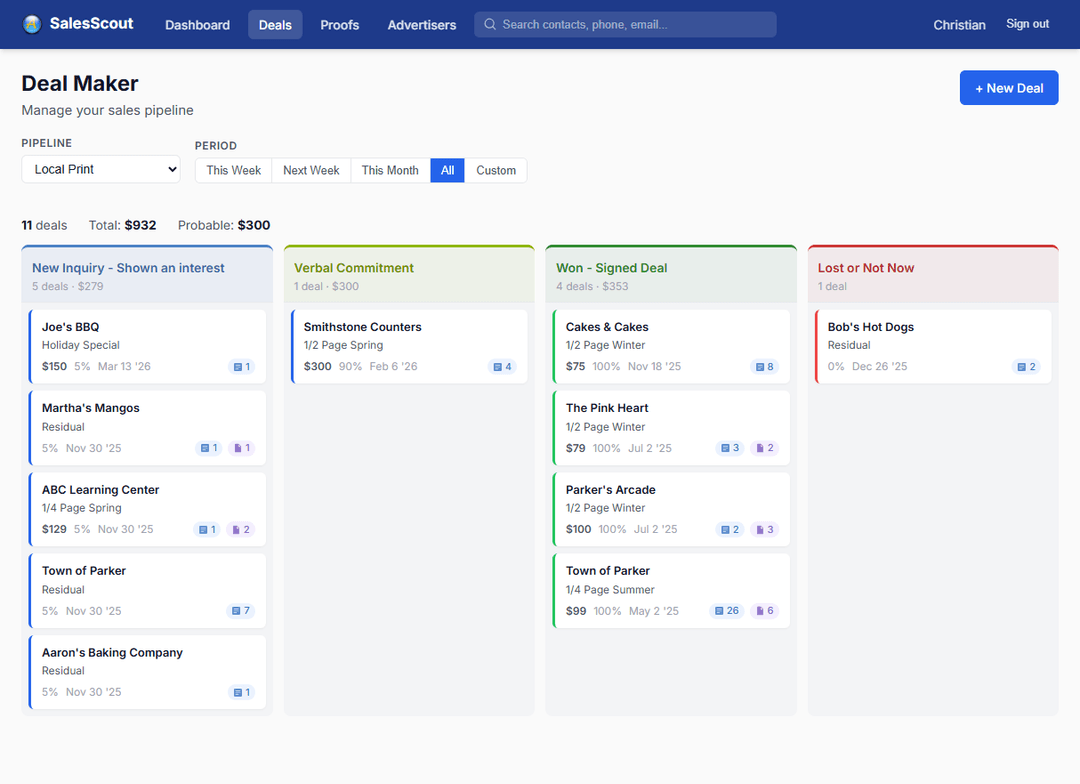
Deal Maker is the pipeline as a board - new inquiry, verbal commitment, won, lost - with the count and the money on each column. A manager reads the month off it instead of asking a rep how it is going.
Columns are your deal stages, set up in AccountScout, not ours
Every card carries the ad, its value, the probability and the close date
Filter by pipeline and period, and the totals across the top follow the filter
FROM WHEREVER THEY ARE
Four steps, none of which need a desk.
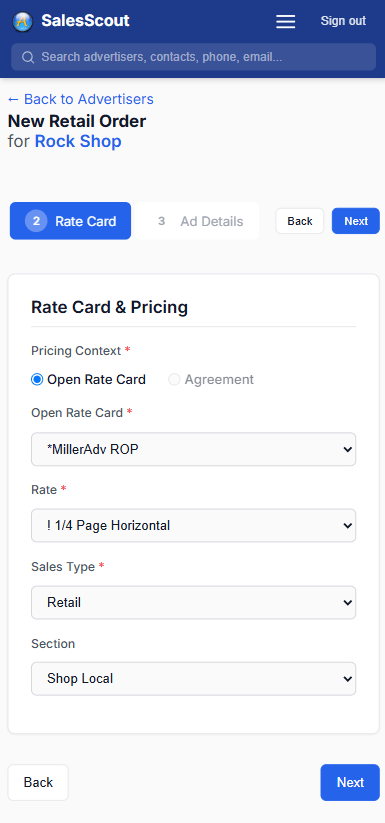
Advertiser, rate card, ad details, schedule. The rep picks a real rate card rather than a copy of one, so the price quoted across a counter is the price that gets invoiced.
Rates, sections and sales types come off the live rate card
A step you have already answered is a tap back, not a restart
The finished order is in AccountScout, so there is nothing to type up later
NOTHING TO INSTALL
A browser tab your reps treat like an app.
SalesScout opens in any modern browser and uses a passwordless login - enter an email address, get a verification code. Reps pin it to a home screen in about fifteen seconds, and after that it opens full screen. No app store, no IT project, no forgotten password.
Phone, tablet, Mac, or PC - the same screens, not a cut-down mobile version
Pin it to a home screen and it opens full screen like any other app
Roles and permissions come from AccountScout, configurable per property
One database with order entry, billing, and production behind it
DIVISION OF LABOR
What runs where.
Two surfaces, one database. Proof approvals work in either, so they appear on both sides.
SalesScout
phone, tablet, or any browser
Prospecting and call logging
Activities and follow-ups
The deals pipeline
Price quotes and field order entry
Taking a payment
Proof approvals
AccountScout desktop
in the office
Bulk email campaigns
Invoicing and statements
A/R and collections
Advanced reporting
Rate cards and deal stage setup
Proof approvals
Included with every subscription
Every user. No per-seat mobile fee.
SalesScout access is included for every AccountScout user - no per-seat mobile fees and no add-on tier. Your whole sales team has it from day one.
“I only use the AccountScout Mobile app. I don't have time to go into the office. I drive 1,000 miles a week, I use it everyday. It's Fake Brains at your fingertips.”
SalesScout is the sales team's window into AccountScout.
AccountScout brings the whole operation - sales, production, billing, and management - into one system. SalesScout is how reps and managers reach it from the field.
A newspaper CRM tracks advertiser accounts, sales activity, and the ad sales pipeline so reps and managers always know account history, balances, and what to do next. SalesScout is the ad sales CRM inside AccountScout - it holds every account's order history, contacts, and balance, lets reps log calls and follow-ups, and shows managers pipeline and goal tracking by rep, team, and publication.
Reps use SalesScout, the web and mobile CRM inside AccountScout. It runs in any modern browser on a phone or tablet, so a rep can pull up an advertiser's history and balance, log a call, build and email a price quote, and enter an order from a client's office or a parked car - working from the same records the office bills against.
Yes. SalesScout has a four-step order wizard - choose the advertiser, then the rate card, rate and section, then publications, features and discounts, then the schedule. A rep can save it as a price quote, email it to the advertiser, and convert it to a live order when it is accepted, all from a phone. Nothing gets re-keyed afterwards.
For an ad sales operation, yes. SalesScout is built around issue dates, rate cards, insertion schedules, and contracts - the objects a publisher actually sells. The trade-off is that it is not a general-purpose CRM for other kinds of businesses.
No. SalesScout opens in a browser and uses a passwordless login - enter your email, get a verification code. Reps can pin it to a home screen so it opens full screen like any other app.
Yes. SalesScout runs in any modern browser and installs to a phone or tablet home screen, so reps can pull up account history and enter orders from a client's office or a car. It does need a connection - there is no offline mode.
Usually yes, and we do it with you. Bringing customer records, contract history, and open receivables across is part of onboarding, not a separate project you run alone.
SalesScout is part of the AccountScout platform rather than a bolt-on CRM, and access is included for every user with no per-seat mobile fees. We'll walk through exactly what that looks like for your operation in a demo.
SalesScout gives managers a color-coded dashboard and activity tracking, so they can see rep activity without asking. Green means on track and red means behind, with goals by rep, team, and publication, Daily Touch KPIs for prospect contacts and follow-ups, and a weekly rep report that flags orders on hold, expiring ads, and activity gaps.
See It In Action
See SalesScout on your own accounts.
Tell us how your sales operation runs today. We'll show you where SalesScout fits - and where it doesn't.